
Use cases / Procurement
Jean, procurement officer
His order acknowledgements and invoices match themselves against the orders.
The first two hours of his day went into re-typing: collecting acknowledgements from his mailbox, comparing them to the orders, correcting the dates in the management software, rebuilding the tracking sheet.
Before
- Documents scattered across mailboxes and supplier portals
- Acknowledgements and invoices re-typed by hand
- Tedious comparisons, and errors that slip through
With AEPUR
- 01The document arrives by email or on the portal, and is archived as is
- 02The data is extracted: supplier, dates, order number, lines, quantities, amounts
- 03Each line is compared to the open orders, the part records and your tolerances
- 04Three verdicts only: compliant, discrepancy to review, blocking anomaly
- 05Jean approves, corrects or rejects with a reason, and the management software follows
After
- Automatic, reliable matching
- Only the discrepancies need his attention
- The management software is updated in one click
- Time given back for analysis and decisions
Building blocks used
01 Trigger02 Capture03 Organize04 See05 Decide06 Act
In their day to day
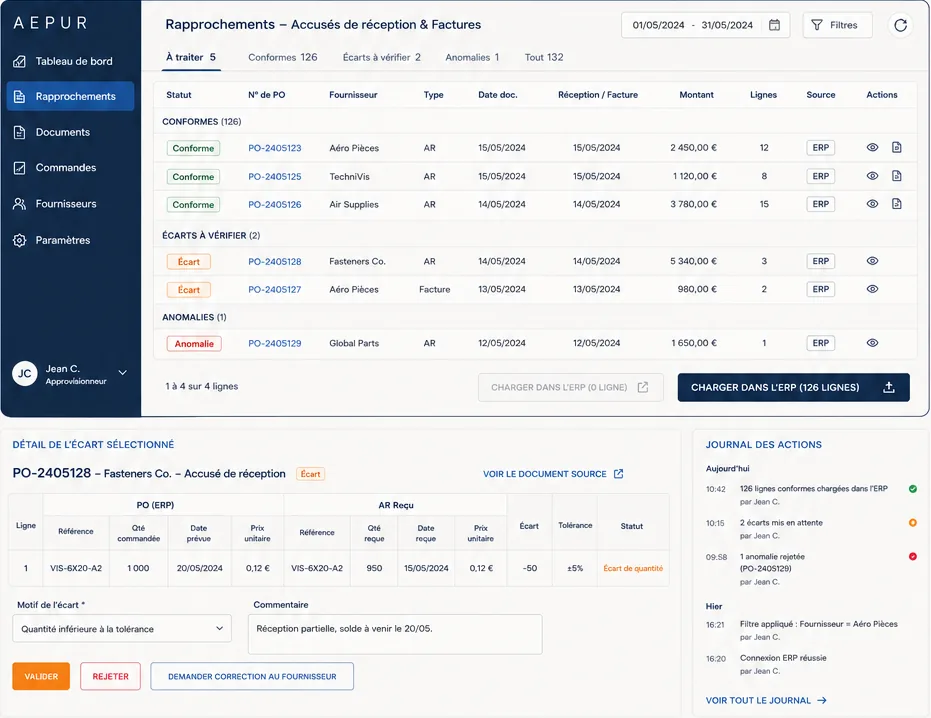
The screen they open in the morning
Jean handles his matching from a single screen: what is compliant goes through in bulk, what does not opens line by line with the original document.
A look at the AEPUR interface
Return on investment
What it gives back to Jean and their team
Team involved
2 peopleprocurementTime saved
2 h / dayaround 40 hours a monthImplementation
3 monthsfrom integration to go-livePays for itself in
4 months
He now only reviews the discrepancies, with the original document beside them. The time he gets back goes into decisions, not re-typing.
The other use cases